
Store & Details Pages
Fetch and decode UTXO listings to browse files and complete secure purchases.
This page shows how to add browsing and purchasing functionality to your marketplace application. We'll be adding the functionality to:
Backend
- Add a
findStorequery to return active listings - Add a
findDetailsquery to return a single listing byfileUrl
Key Server
- Configure the payment middleware for
/purchase/:fileUrl - Implement the
/purchase/:fileUrlroute to update balances and return the decryption key
Frontend
- Wire up a Store page that calls
findStoreand decodes UTXO fields - Wire up a Details page that calls and decodes
findDetails, and submits a purchase to the key server
1. Backend: Store & Details Queries
1.1. Add findStore and findByName to MarketStorage
In backend/src/lookup-services/MarketStorage.ts, add these methods that check for and return active listings:
1// backend/src/lookup-services/MarketStorage.ts
2
3// … existing methods …
4
5/**
6 * Returns all active listings
7 */
8async findStore(): Promise<UTXOReference[]> {
9  return await this.records.find({ retentionPeriod: { $gte: Math.floor(Date.now()) } })
10    .project<UTXOReference>({ txid: 1, outputIndex: 1 })
11    .toArray()
12    .then(results => results.map(record => ({
13      txid: record.txid,
14      outputIndex: record.outputIndex
15    })))
16}
17
18/**
19 * Returns all listings by name
20 */
21async findByName(name: string): Promise<UTXOReference[]> {
22  return await this.records.find({
23    name: { $regex: name, $options: 'i' },
24    retentionPeriod: {
25      $gte: Math.floor(Date.now())
26    }
27  })
28    .project<UTXOReference>({
29      txid: 1,
30      outputIndex: 1
31    })
32    .toArray()
33    .then(results => results.map(record => ({
34      txid: record.txid,
35      outputIndex: record.outputIndex
36    })))
37}What’s happening:
- For both of these methods, use a MongoDB
$gteto compare theretentionPeriodof all of the stored UTXOs with the current time and return thetxidandoutputIndexof those listings. findStorereturns all of the active listings stored in the database, whilefindByNamereturns the listings with the requested name.
1.2. Add findDetails to MarketLookupService
In backend/src/lookup-services/MarketLookupServiceFactory.ts, add the helper functions after the class and update the lookup method to handle both store and details queries:
1// Query type checks
2
3function isNameSearchQuery(query: any): query is {
4  type: 'findByName', value: { name: string }
5} {
6  return (
7    typeof query === 'object' &&
8    query.type === 'findByName' &&
9    query.value &&
10    typeof query.value.name === 'string'
11  )
12}
13
14function isDetailsQuery(query: any): query is {
15  type: 'findDetails'; value: { txid: string, outputIndex: number }
16} {
17  return (
18    typeof query === 'object' &&
19    query.type === 'findDetails' &&
20    query.value &&
21    typeof query.value.txid === 'string' &&
22    typeof query.value.outputIndex === 'number'
23  )
24}1// backend/src/lookup-services/MarketLookupServiceFactory.ts
2export class MarketLookupService implements LookupService {
3 readonly admissionMode: AdmissionMode = 'locking-script'
4 readonly spendNotificationMode: SpendNotificationMode = 'none'
5
6 constructor(public storage: MarketStorage) { }
7
8 // … existing outputAdmittedByTopic and outputSpent …
9
10 async lookup(question: LookupQuestion): Promise<LookupAnswer | LookupFormula> {
11 // … existing lookup queries …
12
13 // store → return all listings that are not expired
14 if (query === 'findStore') {
15 return await this.storage.findStore();
16 }
17
18 // store → return the listings that match the name and are not expired
19 if (isNameSearchQuery(query)) {
20 const { name } = query.value
21 return await this.storage.findByName(name)
22 }
23
24 // details → returns the txid and outputIndex that will be formatted into BEEF
25 if (isDetailsQuery(query)) {
26 const { txid, outputIndex } = query.value
27 console.log(txid, outputIndex)
28 return [{ txid, outputIndex }]
29 }
30
31 throw new Error('Unknown query type')
32 }
33
34 // … existing getDocumentation & getMetaData …
35}What’s happening:
findStore→ whenquery.type === 'findStore', we return the array of UTXO references for active listings.findDetails→ whenquery.type === 'findDetails', we return thetxidandoutputIndex, which thelookupServicewill verify is an unspent token and return the output's BEEF.
2. Frontend: Store Page
2.1. Update App.tsx to point “/” to Store
In frontend/src/App.tsx, change the default route to render Store.tsx instead of the placeholder Home.tsx:
1// frontend/src/App.tsx
2import Store from './pages/Store'
3
4 function App() {
5   return (
6     <Layout>
7       <Routes>
8-        <Route path="/" element={<Home />} />
9+        <Route path="/" element={<Store />} />
10         <Route path="/upload" element={<UploadFile />} />
11         <Route path="/details/:fileUrl" element={<Details />} />
12         <Route path="/account" element={<Account />} />
13       </Routes>
14     </Layout>
15   )
16 }2.2. Implement decodeOutputs.ts
Implement frontend/src/utils/decodeOutputs.ts to decode fields from each UTXO:
1// frontend/src/utils/decodeOutputs.ts
2import { Transaction, PushDrop, Utils } from '@bsv/sdk'
3
4export interface DecodedOutput {
5  fileUrl?: string
6  name?: string
7  description?: string
8  satoshis?: number
9  creatorPublicKey?: string
10  size?: number
11  txid: string
12  outputIndex: number
13  retentionPeriod?: number
14  coverUrl?: string
15}
16
17type FieldKey = keyof DecodedOutput
18
19export async function decodeOutput(
20  beef: number[],
21  outputIndex: number,
22  fields: FieldKey[]
23): Promise<DecodedOutput> {
24  const decodedTx = Transaction.fromBEEF(beef)
25  const outputs = decodedTx.outputs[outputIndex]
26  const decoded = PushDrop.decode(outputs.lockingScript)
27  const data = decoded.fields
28
29  const record: DecodedOutput = {
30    txid: decodedTx.id('hex'),
31    outputIndex,
32  }
33
34  for (const key of fields) {
35    switch (key) {
36      case 'fileUrl':
37        record.fileUrl = Utils.toUTF8(Utils.toArray(data[0]))
38        break
39      case 'name':
40        record.name = Utils.toUTF8(Utils.toArray(data[1]))
41        break
42      case 'description':
43        record.description = Utils.toUTF8(Utils.toArray(data[2]))
44        break
45      case 'satoshis':
46        record.satoshis = parseInt(Utils.toUTF8(Utils.toArray(data[3])), 10)
47        break
48      case 'creatorPublicKey':
49        record.creatorPublicKey = Utils.toUTF8(Utils.toArray(data[4]))
50        break
51      case 'size':
52        record.size = parseInt(Utils.toUTF8(Utils.toArray(data[5])), 10)
53        break
54      case 'retentionPeriod':
55        record.retentionPeriod = parseInt(
56          Utils.toUTF8(Utils.toArray(data[6])),
57          10
58        )
59        break
60      case 'coverUrl':
61        record.coverUrl = Utils.toUTF8(Utils.toArray(data[7]))
62        break
63      case 'txid':
64      case 'outputIndex':
65      default:
66        break
67    }
68  }
69  return record
70}
71
72export async function decodeOutputs(
73  outputs: Array<{ beef: number[]; outputIndex: number }>,
74  fields: FieldKey[]
75): Promise<DecodedOutput[]> {
76  return Promise.all(
77    outputs.map(({ beef, outputIndex }) =>
78      decodeOutput(beef, outputIndex, fields)
79    )
80  )
81}What’s happening:
- We loop over each UTXO’s
beefandoutputIndex, decode the PushDrop script, and then map the requestedfieldsinto aDecodedOutputobject. - For the store page, we only need the
{ name, satoshis, coverUrl, retentionPeriod }fields and we can only request those to be extracted.
2.3. Add lookup query to Store.tsx
Implement the lookup and decoding of the output from the Overlay in the fetchFiles function in frontend/src/pages/Store.tsx:
1// frontend/src/pages/Store.tsx
2
3const fetchFiles = async (query?: string) => {
4  setLoading(true)
5  try {
6    let response = null
7    if (query && filter === 'name') {
8      response = await lookupResolver.query({
9        service: 'ls_demo_market',
10        query: {
11          type: 'findByName',
12          value: { name: searchTerm }
13        }
14      })
15    } else {
16      response = await lookupResolver.query({
17        service: 'ls_demo_market',
18        query: 'findStore'
19      })
20    }
21    if (response.type !== 'output-list') throw new Error('Lookup answer must be an output-list')
22
23    const fileData = await decodeOutputs(response.outputs, fields)
24    setFiles(fileData as StoreRecord[])
25  } catch (error) {
26    console.error('Error fetching files:', error)
27  } finally {
28    setLoading(false)
29  }
30}What’s happening:
- We create a
lookupResolverquery asking for the - We decode each returned UTXO for the fields needed to render a card.
- The UI displays a grid of cards; each links to
/details/{txid}.{outputIndex}.
3. Key Server: Purchase Route
3.1. Add payment middleware logic
Start by adding this query function to key-server/src/KeyStorage.ts that returns the details of a stored file:
1async findByQuery(
2  fileUrl: string
3): Promise<KeyRecord[]> {
4  try {
5    return await this.records
6      .find({ fileUrl })
7      .toArray();
8  } catch (error) {
9    console.error('Failed to find records by query:', error);
10    throw error;
11  }
12}Now in key-server/src/index.ts, we want to configure the payment middleware to process a transaction when the /purchase route is accessed:
1// key-server/src/index.ts
2import { createAuthMiddleware } from '@bsv/auth-express-middleware'
3import { createPaymentMiddleware } from '@bsv/payment-express-middleware'
4import { getWallet } from './utils/walletSingleton.js'
5
6// … after getWallet() …
7
8app.use(createAuthMiddleware({
9  wallet,
10  allowUnauthenticated: false,
11  logger: console,
12  logLevel: 'error'
13}))
14
15app.use(createPaymentMiddleware({
16  wallet,
17  calculateRequestPrice: async (req) => {
18    // only request a payment if the url includes /purchase
19    if (!req.url.includes('/purchase')) {
20      return 0
21    }
22    const { fileUrl } = (req.body as any) || {}
23    try {
24      if (!fileUrl) return 0
25      const record = await keyStorage.findByQuery(fileUrl)
26      if (!record || record.length != 1) {
27        return 0
28      }
29      console.log(record[0].satoshis)
30      return record[0].satoshis
31    } catch (e) {
32      return 0
33    }
34  }
35}))What’s happening:
- All incoming requests pass through an auth check via
AuthMiddleware, requiringAuthFetchand a connected BRC-100 wallet to access. PaymentMiddlewareis now configured to charge on/purchase/:fileUrl, parsing thefileUrlfrom the body and querying the key server database for the price of the file.- The
PaymentMiddlewarethen charges the purchaser of the file with the cost and stores the satoshis on the key server.
3.2 Add balance collection to the database
In key-server/src/KeyStorage.ts, create a new MongoDB collection to store and to increment the file uploader's balance when anyone buys their files so that they can later withdraw and receive the satoshis:
1// key-server/src/types.ts
2
3export interface BalanceRecord {
4  publicKey: string
5  balance: number
6}1// key-server/src/KeyStorage.ts
2
3import dotenv from 'dotenv'
4import { Collection, Db } from 'mongodb'
5import { BalanceRecord, KeyRecord } from './types.js'
6
7dotenv.config()
8
9const KEY_COLLECTION_NAME = process.env.KEY_COLLECTION_NAME as string
10const BALANCE_COLLECTION_NAME = process.env.BALANCE_COLLECTION_NAME as string
11
12export class KeyStorage {
13 private readonly records: Collection<KeyRecord>
14 private readonly balances: Collection<BalanceRecord>
15
16 constructor(private readonly db: Db) {
17 this.records = db.collection<KeyRecord>(KEY_COLLECTION_NAME)
18 this.balances = db.collection<BalanceRecord>(BALANCE_COLLECTION_NAME)
19 }
20 // …Also add the incrementBalance method that increments the given public key's balance, creating a new entry in the collection if one does not already exist:
1async incrementBalance(
2  publicKey: string, amount: number
3): Promise<void> {
4  if (amount <= 0) return
5
6  await this.balances.updateOne(
7    { publicKey },
8    { $inc: { balance: amount } },
9    { upsert: true }
10  )
11}3.3. Implement /purchase
After the payment middleware processes the transaction and stores the purchaser's satoshis on the server, the /purchase/:fileUrl route will be accessed and will need
In key-server/src/index.ts:
1// key-server/src/index.ts (add after /submit)
2
3app.post('/purchase/:fileUrl', async (req: Request, res: Response): Promise<any> => {
4  try {
5    const { fileUrl } = req.body
6    if (!fileUrl) return res.status(400).json({ error: 'No fileUrl provided' })
7
8    // lookup matching record
9    const record = await keyStorage.findByQuery(fileUrl)
10    if (!record || record.length != 1) {
11      return res.status(404).json({ error: 'File not found on key storage' })
12    }
13
14    // increment uploader’s balance
15    const { satoshis, publicKey } = record[0]
16    await keyStorage.incrementBalance(publicKey, satoshis)
17
18    // return decryption key to purchaser
19    const encryptionKey = record[0].encryptionKey
20    return res.status(200).json({
21      success: true,
22      message: `Uploader balance updated. +${satoshis} sats for ${publicKey}`,
23      encryptionKey
24    })
25  } catch (error) {
26    console.error('Error processing purchase:', error)
27    return res.status(500).json({ error: (error as Error).message })
28  }
29})What’s happening:
- We read
fileUrlfrom the URL parameter. - We query
filescollection viafindByQuery(fileUrl)(returns the matching record). - We call
incrementBalance(publicKey, satoshis)to credit the uploader. - We return
{ encryptionKey }so the buyer can decrypt the STL file.
4. Frontend: Details Page
4.1. Add lookup query to Details.tsx
First we need to add the query and parse the information of the requisite file. We are getting the txid and outputIndex from the URL of the page:
1// frontend/src/pages/Details.tsx
2
3const fetchDetails = async () => {
4  try {
5    const response = await lookupResolver.query({
6      service: 'ls_demo_market',
7      query: {
8        type: 'findDetails',
9        value: {
10          txid,
11          outputIndex: parseInt(outputIndex || '0', 10)
12        }
13      }
14    })
15    if (response.type !== 'output-list') throw new Error('Lookup answer must be an output-list')
16
17    const fileData = await decodeOutputs(response.outputs, fields)
18    setDetails(fileData[0] as DetailsRecord)
19  } catch (error) {
20    throw new Error(`Error fetching details: ${error}`)
21  } finally {
22    setIsLoading(false)
23  }
24}Next, we want to implement the purchasing and decryption of the file:
1// frontend/src/pages/Details.tsx
2
3const handlePurchase = async () => {
4  try {
5    if (!details) return
6    setIsLoading(true)
7
8    const fileUrl = details.fileUrl
9    if (!fileUrl) {
10      throw new Error('No fileUrl available to purchase!')
11    }
12
13    console.log('File url:', fileUrl)
14
15    const wallet = new WalletClient('auto')
16    const authFetch = new AuthFetch(wallet)
17
18    const keyUrl = `${constants.keyServer}/purchase/${fileUrl}`
19
20    // hit the /purchase endpoint and trigger the payment middleware
21    let payResponse
22    try {
23      payResponse = await authFetch.fetch(
24        keyUrl,
25        {
26          method: 'POST',
27          body: JSON.stringify({ fileUrl }),
28          headers: {
29            'Content-Type': 'application/json'
30          }
31        }
32      )
33    } catch (error) {
34      throw new Error(`Failed to complete purchase: ${error}`)
35    }
36    if (!payResponse) throw new Error('Failed to complete purchase')
37
38    const purchaseResult = await payResponse.json()
39    const encryptionKey = purchaseResult.encryptionKey
40    if (!encryptionKey) {
41      if (!purchaseResult.description) {
42        throw new Error('Purchase was successful, but no encryptionKey was returned.')
43      }
44      else {
45        throw new Error(purchaseResult.description)
46      }
47    }
48
49    const storageDownloader = new StorageDownloader()
50    const { data: encryptedBytes, mimeType } = await storageDownloader.download(fileUrl)
51    console.log('Downloaded file from UHRP, mimeType:', mimeType)
52
53    // decrypting the file
54    const symmetricKey = new SymmetricKey(encryptionKey, 'hex')
55    const decryptedBytes = symmetricKey.decrypt(encryptedBytes) as number[] // test
56
57    const blob = new Blob(
58      [Uint8Array.from(decryptedBytes)],
59      { type: 'model/stl' })
60    const url = URL.createObjectURL(blob)
61    setDecryptedFileURL(url)
62  } catch (error) {
63    console.error('Error during purchase:', error)
64  } finally {
65    setIsLoading(false)
66  }
67}What’s happening:
- On purchase, call the key server’s
/purchase/:fileUrlendpoint, which causes the payment middleware to facilitate the transaction. - The key server then credits the file uploader’s balance and responds with the
encryptionKeyon success. - The frontend then decrypts the file using the key and allows the purchaser to download the STL file.
5. Summary
With these changes in place, your marketplace now supports browsing active listings, viewing detailed file information, and securely purchasing and decrypting 3D-printable files.
1my-marketplace/
2├── backend/
3│   ├── src/
4│   │   ├── lookup-services/
5│   │   │   ├── MarketLookupServiceFactory.ts
6│   │   │   └── MarketStorage.ts
7│   │   ├── topic-managers/
8│   │   │   └── MarketTopicManager.ts
9│   │   ├── types.ts
10│   │   └── … other backend files …
11│   └── package.json
12├── frontend/
13│   ├── src/
14│   │   ├── pages/
15│   │   │   ├── Store.tsx
16│   │   │   └── Details.tsx
17│   │   ├── utils/
18│   │   │   ├── decodeOutputs.ts
19│   │   │   └── publishCommitment.ts
20│   │   ├── App.tsx
21│   │   └── … other frontend files …
22│   └── package.json
23├── key-server/
24│   ├── src/
25│   │   ├── index.ts       ← includes /purchase/:fileUrl
26│   │   ├── KeyStorage.ts
27│   │   ├── types.ts
28│   │   └── utils/
29│   │       └── decodeOutputs.ts
30│   └── package.json
31├── deployment-info.json
32└── package.jsonBackend:
findStorereturns active listing references.findDetailsreturns a reference for a givenfileUrl.
Frontend:
- Store.tsx displays active listings by decoding fields:
{ name, description, satoshis, coverUrl }. - Details.tsx shows listing details, decodes
{ fileUrl, name, description, satoshis, creatorPublicKey, size, retentionPeriod, coverUrl }, and calls/purchase/:fileUrl.
Key Server:
/purchase/:fileUrlcredits the uploader’s balance and returns theencryptionKeyto the buyer.
6. Verify in the UI
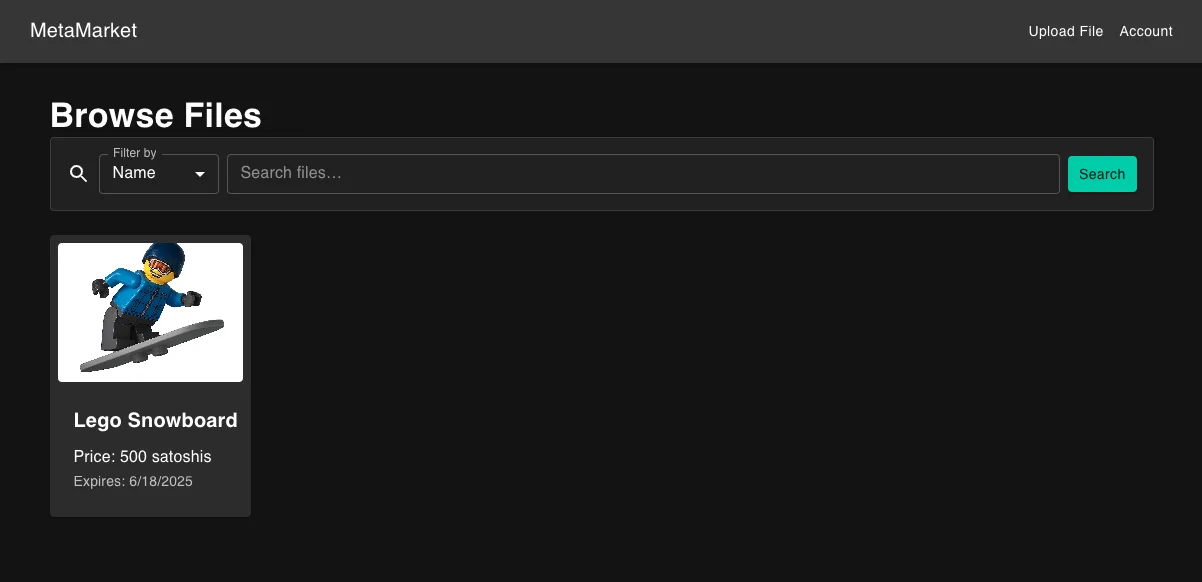
Once you’ve uploaded a file and completed the purchase flow, your Store and Details pages will render real data from your Overlay and Key Server.
Store Page
Details Page
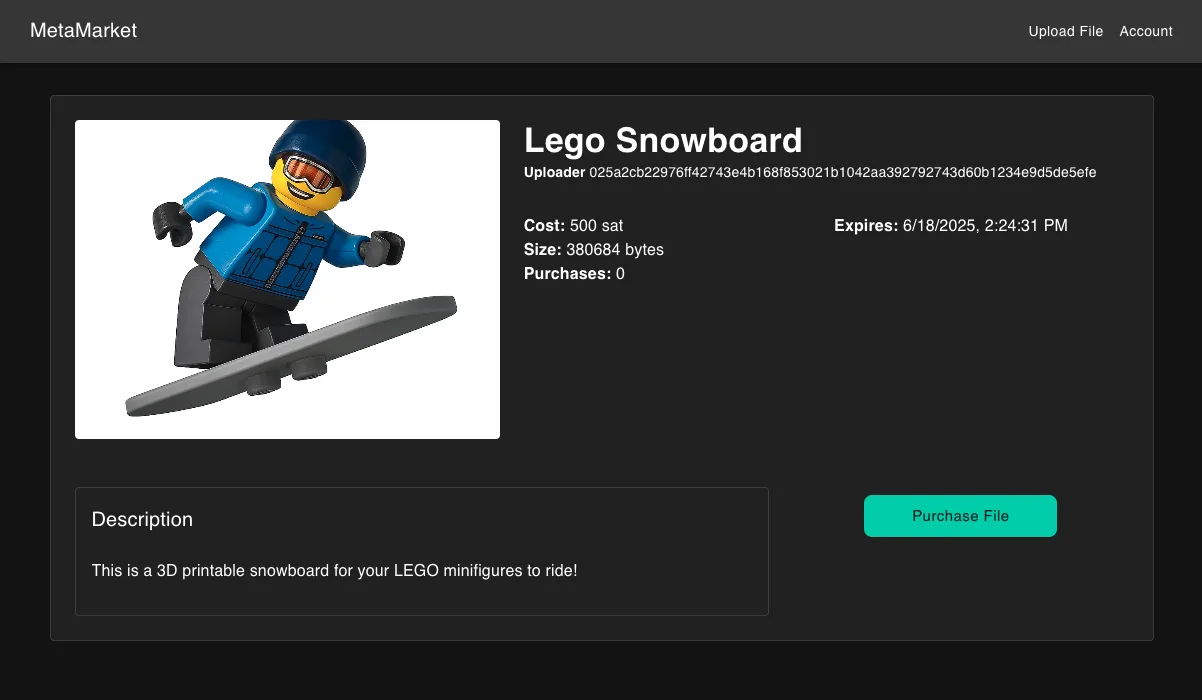
With these changes, readers can browse all of the listed files, view the details, and purchase to receive the decrypted file to download!