
Your First BSV App
A step-by-step tutorial for developers looking to create their first BSV application, covering everything from project setup through transaction creation and wallet integration—all built on the BRC specifications for maximum interoperability. Then, deploy your app online!
Let's build a simple ToDo List application on the BSV Blockchain — complete with tokenized tasks, encryption, and a React UI! By the end, you’ll have a functioning local development setup that uses the TypeScript SDK and a BRC-100-compliant wallet (via WalletClient) to create and inspect encrypted ToDo items. (BRC-100 defines wallet-to-app communication)
You’ll also see how these tasks reside as tokens in a “basket,” demonstrating basic UTXO-based asset tokenization.
What You’ll Build
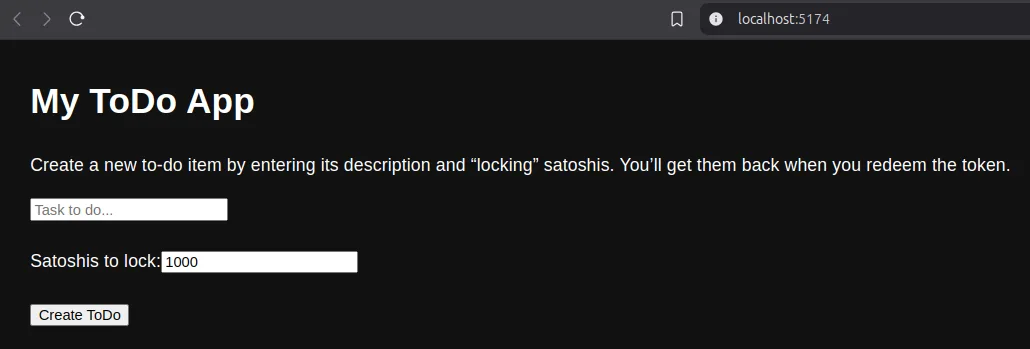
A simple ToDo List app, where:
- You create a ToDo token by setting aside some satoshis.
- The “task” text is encrypted (so only you can read it).
- You inspect the created token and learn where redemption fits as an advanced follow-up.
Your tasks each live as a separate unspent transaction output (UTXO) in a special “basket,” representing them as tokens on the blockchain. You’ll also see the full BRC-102 structure, meaning you’ll have:
- A frontend/ directory containing a React application,
- A deployment-info.json describing what to run locally,
- Minimal setup for local dev (LARS) and an example “ToDo tokens” basket usage.
Prerequisites
- Node.js 22 or 24 (maintained and patched) installed. (check with
node -vandnpm -v). - A BSV Wallet installed and running locally. Go here to get one!
- Basic TypeScript, Node, React, and terminal skills.
Why It’s Interesting
- Showcases the UTXO model: Each task is a token that lives in your wallet “basket.”
- Uses the
WalletClientfrom the BSV TypeScript SDK for encryption, signature creation, and more. - Demonstrates a minimal “contract” with an encrypted data field, “PushDrop,” stored on-chain.
- Illustrates the BRC-100 approach to “wallet → app” communications.
Project Setup
Below is a skeleton of the BRC-102 structure you’ll have. Create a new folder, for example named todo-bsv/:
1todo-bsv/
2 ├─ deployment-info.json
3 ├─ frontend/
4    ├─ src/
5       ├─ index.tsx
6       ├─ theme.ts
7       ├─ App.tsx
8       └─ ...
9    ├─ index.html
10    ├─ package.json
11    └─ vite.config.ts
12 ├─ .gitignore
13 └─ package.jsondeployment-info.json will instruct local dev tools what to run and how to run it, following the BRC-102 standard.
Initialize
From an empty folder, run:
1npm init -yThis generates your root package.json.
Add Your Tools
Install the local LARS runtime for development, and CARS for deploying your app later:
1npm install --save-dev @p2ppsr/lars@latest @p2ppsr/cars-cli@latestThen, you should edit your new package.json file to replace the scripts section with this lars/cars enhanced version:
1"scripts": {
2  "lars": "lars",
3  "cars": "cars",
4  "lars:config": "lars config",
5  "start": "lars start",
6  "build": "npm --prefix frontend run build",
7  "deploy": "echo \"Add a CARS deployment config before deploying\" && exit 1",
8  "test": "echo \"Error: no test specified\" && exit 1"
9}If you're using git, you'll also want to create a .gitignore file to ignore unnecessary files. You can use this full version of the file download from here. Or you could use this local command or similar, it is important to have this file if you use git to avoid potential version control issues:
1printf "node_modules/\ndist/\nbuild/\n.env\n" > .gitignoreFor a minimal React app, create a frontend/ directory and then you can add the additional files you require and install the dependencies using this script or similar:
1cd frontend
2npm init -y
3touch vite.config.ts
4touch index.html
5mkdir src
6touch src/index.tsx
7touch src/theme.ts
8touch src/App.tsx
9npm init -y
10npm install react react-dom @bsv/sdk @mui/system @emotion/react @emotion/styled @mui/material @mui/icons-material react-toastify
11npm install --save-dev vite typescript @types/react @types/react-dom @vitejs/plugin-reactYou have now installed @bsv/sdk (the BSV TypeScript SDK), vite for development, and MUI for your UI.
Next, update the frontend/package.json to include scripts for running and building the app. Open frontend/package.json and ensure the scripts section looks like this:
1"scripts": {
2  "start": "vite",
3  "build": "vite build",
4  "test": "echo \"Error: no test specified\" && exit 1"
5}This ensures LARS can start the frontend using npm start in the frontend/ directory.
Complete frontend/package.json (Optional Reference):
If you prefer to copy a complete frontend/package.json, here’s what it should look like after the above steps:
1{
2  "name": "frontend",
3  "version": "1.0.0",
4  "description": "",
5  "main": "index.js",
6  "scripts": {
7    "start": "vite",
8    "build": "vite build",
9    "test": "echo \"Error: no test specified\" && exit 1"
10  },
11  "keywords": [],
12  "author": "",
13  "license": "ISC",
14  "dependencies": {
15    "react": "latest",
16    "react-dom": "latest",
17    "@bsv/sdk": "latest",
18    "@mui/system": "latest",
19    "@emotion/react": "latest",
20    "@emotion/styled": "latest",
21    "@mui/material": "latest",
22    "@mui/icons-material": "latest",
23    "react-toastify": "latest"
24  },
25  "devDependencies": {
26    "vite": "latest",
27    "typescript": "latest",
28    "@types/react": "latest",
29    "@types/react-dom": "latest",
30    "@vitejs/plugin-react": "latest"
31  }
32}Alternatively, you can find the current package.json for the todo-ts repo here.
You have now installed @bsv/sdk (the BSV TypeScript SDK), vite for development, and MUI for your UI.
deployment-info.json
In your project root, create deployment-info.json:
1{
2  "schema": "bsv-app",
3  "schemaVersion": "1.0",
4  "frontend": {
5    "language": "react",
6    "sourceDirectory": "./frontend"
7  },
8  "configs": [
9    {
10      "name": "Local LARS",
11      "provider": "LARS",
12      "network": "mainnet",
13      "run": ["frontend"]
14    }
15  ]
16}This says:
- This project follows the
bsv-appschema (BRC-102). - The project has a React frontend in
frontend/. - The project has one local config named
"Local LARS"that runs the frontend.
Why “mainnet” here?
You can set it to "testnet" if your wallet and environment use testnet. The BSV TypeScript SDK allows either, as long as the wallet is configured accordingly.
Creating the React App
Within frontend/, put a minimal vite.config.ts:
1import { defineConfig } from 'vite'
2import react from '@vitejs/plugin-react'
3
4// https://vitejs.dev/config/
5export default defineConfig({
6  plugins: [react()],
7  build: {
8    outDir: 'build' // required for LARS to run
9  }
10})Add this into your index.html file:
1<!DOCTYPE html>
2<html lang="en">
3<head>
4  <meta charset="UTF-8" />
5  <title>My First BSV App</title>
6</head>
7<body>
8  <div id="root"></div>
9  <script type="module" src="/src/index.tsx"></script>
10</body>
11</html>Then add this TypeScript code to your source files as shown below:
frontend/src/index.tsx
1import React from 'react'
2import ReactDOM from 'react-dom/client'
3import { CssBaseline } from '@mui/material'
4import { ThemeProvider } from '@mui/material/styles'
5import App from './App'
6import web3Theme from './theme'
7import { ToastContainer } from 'react-toastify'
8import 'react-toastify/dist/ReactToastify.css'
9
10const rootElement = document.getElementById('root')
11
12if (rootElement === null) {
13  throw new Error('Failed to find the root element')
14}
15
16const root = ReactDOM.createRoot(rootElement)
17
18root.render(
19  <ThemeProvider theme={web3Theme}>
20    <ToastContainer
21      position="top-center"
22      autoClose={5000}
23      hideProgressBar={false}
24      newestOnTop={false}
25      closeOnClick
26      pauseOnFocusLoss
27      draggable
28      pauseOnHover
29    />
30    <CssBaseline />
31    <App />
32  </ThemeProvider>
33)frontend/src/theme.ts
1import { createTheme } from '@mui/material/styles'
2
3// Define a custom theme with a dark background
4
5// Define custom spacing function compatible with Spacing type
6const customSpacing = (factor: number): string => `${8 * factor}px`
7
8// Create custom theme using createTheme
9const web3Theme = createTheme({
10  palette: {
11    mode: 'dark',
12    primary: {
13      main: '#00d1b2'
14    },
15    secondary: {
16      main: '#7e57c2'
17    },
18    background: {
19      default: '#121212',
20      paper: '#242424'
21    },
22    error: {
23      main: '#ff3860'
24    }
25  },
26  typography: {
27    fontFamily: '"Roboto", "Helvetica", "Arial", sans-serif',
28    h4: {
29      fontWeight: 700
30    },
31    button: {
32      textTransform: 'none'
33    }
34  },
35  // Override default MUI spacing with custom spacing function
36  spacing: customSpacing
37})
38
39export default web3Theme // Export custom themeNow you have all the basic structure covered. Time to build!
Note: The code below implements the task creation functionality, allowing you to encrypt a task and lock satoshis into a token on the BSV blockchain. This initial version focuses solely on creating ToDo items. Later, we’ll provide an updated version with a redemption feature as an optional exercise for you to complete.
frontend/src/App.tsx
1import React, { useState, ChangeEvent } from 'react'
2import { WalletClient, Utils, PushDrop } from '@bsv/sdk'
3
4/**
5 * This UI demonstrates a simple "create ToDo item" functionality stored on the blockchain.
6 * The user's BSV wallet provides encryption keys for securing transactions via WalletClient.
7 * Tasks are encrypted, locked into a PushDrop script, and broadcast as a transaction.
8 */
9const walletClient = new WalletClient('auto')
10
11export default function App (): JSX.Element {
12  const [taskDescription, setTaskDescription] = useState<string>('')
13  const [taskValue, setTaskValue] = useState<number>(1000) // Default satoshis to lock
14
15  /**
16   * Handles creating a new ToDo task by encrypting the description,
17   * locking it in a PushDrop script, and broadcasting it to the blockchain.
18   * @returns {Promise<void>} Resolves when the task is created or throws an error.
19   */
20  async function createTask (): Promise<void> {
21    try {
22      // Validate task description to ensure it's not empty
23      if (taskDescription.trim() === '') {
24        alert('Please enter a task first!')
25        return
26      }
27
28      // 1) Encrypt the user's task description
29      const { ciphertext } = await walletClient.encrypt({
30        plaintext: Utils.toArray(taskDescription, 'utf8'),
31        protocolID: [0, 'todo list'],
32        keyID: '1'
33      })
34
35      // 2) Create a PushDrop output script with the encrypted task
36      const pushdrop = new PushDrop(walletClient)
37      const lockingScript = await pushdrop.lock(
38        [ciphertext], // Token field 0: encrypted task text
39        [0, 'todo list'], // Protocol ID
40        '1', // Key ID
41        'self' // Recipient
42      )
43
44      // 3) Form and broadcast the transaction with the task
45      const action = await walletClient.createAction({
46        description: `Create a new ToDo: ${taskDescription}`,
47        outputs: [
48          {
49            lockingScript: lockingScript.toHex(), // Convert script to hex format
50            satoshis: taskValue, // Amount of satoshis to lock
51            basket: 'todo tokens', // Categorize output
52            outputDescription: 'Create task token' // Output description
53          }
54        ]
55      })
56
57      // Notify user of success and reset input
58      alert(`Task Created! TX: ${action.txid ?? 'unknown'}`)
59      setTaskDescription('')
60    } catch (e: unknown) {
61      // Handle and display errors gracefully
62      const errorMessage =
63        e instanceof Error ? e.message : 'Unknown error occurred'
64      console.error('Task creation failed:', e)
65      alert(`Error: ${errorMessage}`)
66    }
67  }
68
69  // Handler for task description input change
70  const handleDescriptionChange = (e: ChangeEvent<HTMLInputElement>): void => {
71    setTaskDescription(e.target.value)
72  }
73
74  // Handler for satoshi value input change
75  const handleValueChange = (e: ChangeEvent<HTMLInputElement>): void => {
76    setTaskValue(Number(e.target.value))
77  }
78
79  // Handler for button click to trigger task creation
80  const handleCreateTask = (): void => {
81    createTask().catch(e => console.error('Failed to create task:', e))
82  }
83
84  return (
85    <div style={{ margin: '2rem' }}>
86      <h1>My ToDo App</h1>
87      <p>
88        Create a new to-do item by entering its description and “locking”
89        satoshis. You’ll get them back when you redeem the token.
90      </p>
91      <input
92        type='text'
93        placeholder='Task to do...'
94        value={taskDescription}
95        onChange={handleDescriptionChange} // Explicitly typed handler
96      />
97      <br />
98      <br />
99      <label>
100        Satoshis to lock:
101        <input
102          type='number'
103          min={1}
104          value={taskValue}
105          onChange={handleValueChange} // Explicitly typed handler
106        />
107      </label>
108      <br />
109      <br />
110      <button onClick={handleCreateTask}>Create ToDo</button>
111    </div>
112  )
113}Running Locally
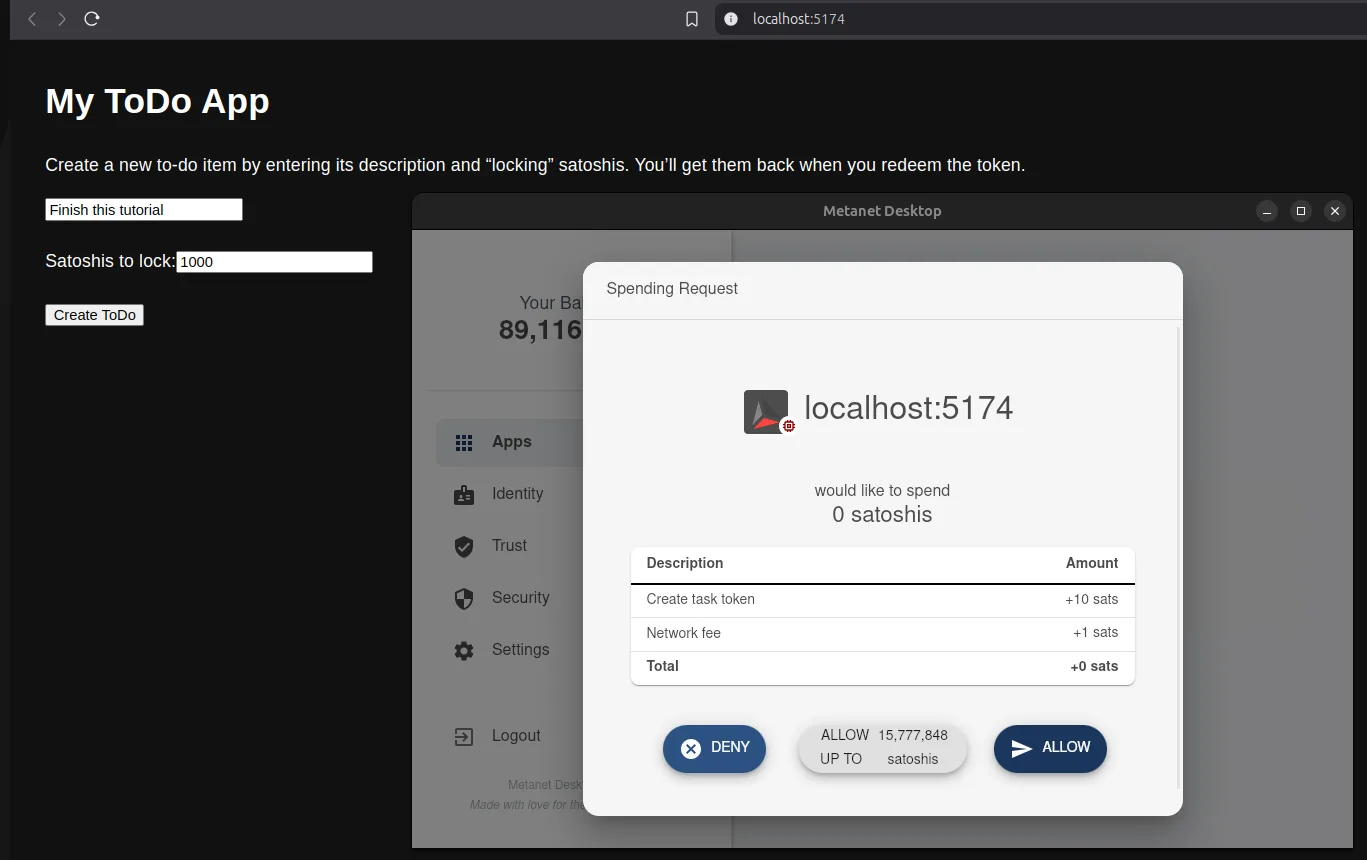
From your root dir (todo-bsv), run npm run start and visit http://localhost:5173 (check terminal for port). Ensure your wallet is running for signing.
Navigate back with cd .. if you’re still in frontend/.
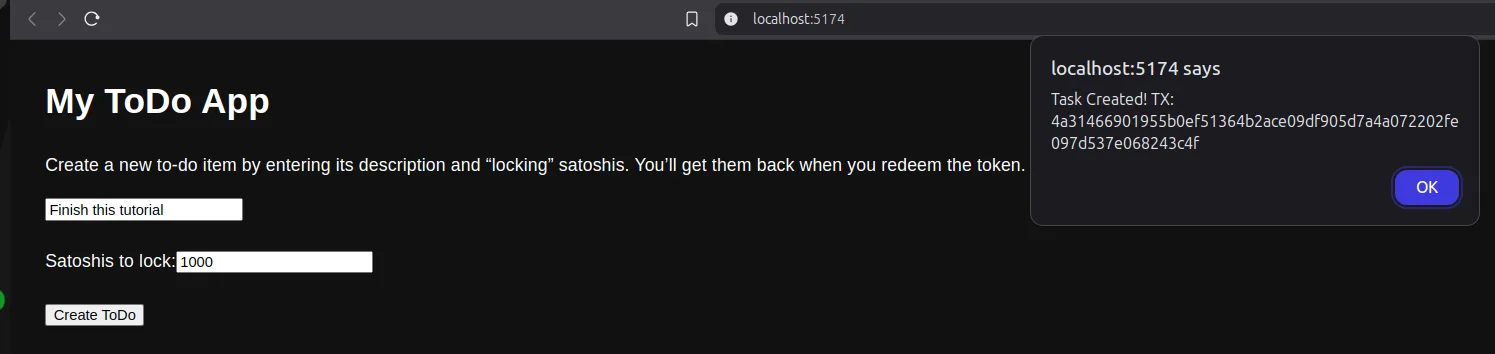
Launch your browser and navigate to the designated port. If you have a BRC-100 wallet such as BSV Desktop running, wallet prompts will ask you to grant encryption permission and sign the transaction. Once the payment is finalized, an alert will display your txid (transaction ID). Enter this txid on WhatsOnChain.com to inspect your task token on the BSV mainnet blockchain. Paste the txid into the WhatsOnChain.com search field to monitor its status as it updates.
Remaining Concepts
Let's think through how you could extend the app after the create path works.
Redeeming (Completing) a ToDo
When the user finishes a task, they can spend their token to themselves, effectively reclaiming the satoshis. In a real app, you keep track of the outpoint (the “token ID”), BEEF data, and locking script for the selected output, then produce an unlocking script for that exact output.
Do not paste a placeholder redemption block into your first app. Finish the create path first, then implement redemption from the wallet output you selected. The moving pieces are:
listOutputs({ basket: 'todo tokens' })to find unspent task tokens.- Decode the selected output with PushDrop and decrypt the task text.
- Use
walletClient.createActionwith the selected outpoint as an input. - Use the same PushDrop protocol parameters to build the unlocking script.
- Call
walletClient.signActionwith the unlocking script and show the returned txid.
A minimal shape looks like this:
1async function redeemTask(tokenOutpoint: string): Promise<void> {
2  const { signableTransaction } = await walletClient.createAction({
3    description: 'Redeem a ToDo item',
4    inputs: [{
5      outpoint: tokenOutpoint,
6      inputDescription: 'redeem the to-do token',
7      unlockingScriptLength: 108
8    }]
9  })
10  if (signableTransaction == null) {
11    throw new Error('Wallet did not return a signable transaction')
12  }
13  // Advanced: use pushdrop.unlock(...) and walletClient.signAction(...)
14  // with the selected output's BEEF and locking script.
15}So far, you’ve built an app that creates ToDo tokens. Treat redemption as the next advanced exercise after you can reliably list and inspect the wallet outputs created by this tutorial.
Retrieving ToDo Items
So far, you’ve completed the create task. If you’d like a list of unredeemed tasks, you can ask the wallet for all outputs in a “basket.”
1const tasks = await walletClient.listOutputs({ basket: 'todo tokens' })
2for (const t of tasks.outputs) {
3  console.log('Unspent token outpoint =>', t.outpoint)
4  const { satoshis } = t
5  // Possibly also decipher the pushdrop-encrypted content with `PushDrop.decode()` and `walletClient.decrypt()`
6}This is how you can display an overview of tasks on the UI:
listOutputs({ basket: 'todo tokens' })gives unredeemed tokens.- For each, decode with PushDrop and decrypt the embedded “task text.”
Putting It All Together
At a high level, your final app might look like this:
-
Initial Load:
listOutputs({ basket: 'todo tokens' })to fetch unredeemed tasks.- Decrypt each to show the user’s actual “to-do text.”
-
Create:
- The user types a new task.
- You call
walletClient.encrypt(...)to encrypt text. - You create a PushDrop output (
pushdrop.lock(), callingwalletClient.createAction(...)to finalize and broadcast.
-
Redeem:
- The user clicks “Complete,” referencing that token’s
outpoint. - You do
createActionwith the old token as an input withpushdrop.unlock(), returning the satoshis to yourself.
- The user clicks “Complete,” referencing that token’s
-
Refresh:
- Reload or re-call “listOutputs” to see which tasks remain.
This fosters a “tokenized to-do list”: each unredeemed UTXO is a “task,” and completion reclaims your deposit.
Deploying Your App
Up till now, you've been running your app locally in LARS. But deploying is effortless, since CARS (the Cloud Automated Runtime System) is compatible with all LARS projects out of the box. Just:
npm run carsto open the CARS menu system in your terminal- Create a new CARS config, and select a hosting provider from the list
- Build an artifact
- Go to "manage project" and top up your hosting balance from BSV Desktop before releasing
- Go to "releases" and "auto-release" the project
- Once successful, you can "Get Project Info" in the project menu to see your frontend URL
- You can also "Set Custom Frontend Domain" and follow the on-screen instructions to point your own website name at your new app
Now you can share your BSV app with users and collaborators! To update it just build another artifact and auto-release again. Your host should email you when your balance gets low or you could even run your own CARS!
Where to Next?
- Overlay Services: If you want a global shared to-do list, you can use an overlay network (topic managers + lookup services). That’s beyond simple wallets, but it’s the next step to let multiple users share “ToDo tokens.”
- Advanced PushDrop: Consider storing extra data (like deadlines, priorities) in multiple PushDrop fields.
- Identity: Explore the
IdentityClientto link tasks to your on-chain identity. - Contracts: Use sCrypt to define agreements among people, companies, and even open blockchain bounties claimable by anyone in the world.
Summary
You’ve created a minimal BRC-102–structured project:
- frontend/ for the React app,
- deployment-info.json to define local dev configs,
- WalletClient usage in your code for encryption, signing, and listing.
From this skeleton, you can spin up bigger UTXO-based token flows for anything: from timed deposit contracts to mini games to complex multi-user overlay services. The BSV blockchain’s stable protocol, combined with the robust TypeScript SDK and a user’s BRC-100 wallet, makes all these flows simpler (and more scalable) than on other blockchains.
Congratulations! You have a running local dApp on BSV, complete with tokenization and encryption. Your to-do items truly live as tokens in your wallet. When you’re ready for more advanced features—like multi-user overlays or contract-based logic beyond simple pushdrop—just build on these same fundamentals. Enjoy your new BSV-powered app!