
Frontend Uploading
Encrypt STL files and cover images, upload to UHRP, and broadcast PushDrop transactions.
This page shows how to scaffold and implement the Upload Files flow in your React frontend. We'll:
- Clone and set up the starter repository
- Explore the starter's directory structure
- Explain the
UploadFile.tsxcomponent and its inputs - Walk through
publishCommitment.tsin detail:- Validate file inputs and prepare encryption
- Upload to UHRP
- Create and broadcast the PushDrop token
- Submit metadata to the Key Server
1. Clone & set up the starter
We provide a starter file for the frontend for this quickstart that provides the general structure of the project and all of the UI elements which will not be covered in this guide. This starter will fully replace the current frontend folder, so begin by removing and replacing it from the root directory.
1rm -rf frontend
2git clone https://github.com/p2ppsr/marketplace-frontend-starter.git frontend
3cd frontend
4npm installThis starter provides pre-built pages, routes, and UI components so you can focus on implementing the upload and store logic rather than boilerplate setup.
2. Starter directory structure
After npm install, your directory should look like:
1backend/
2frontend/                        ← React + Vite project (replacing the template)
3├── index.html
4├── package.json
5├── public/
6├── src
7│   ├── App.tsx
8│   ├── constants.ts             ← Key server constants
9│   ├── index.tsx
10│   ├── Layout.tsx
11│   ├── pages
12│   │   ├── Account.tsx
13│   │   ├── Details.tsx
14│   │   ├── Home.tsx             ← placeholder main page
15│   │   ├── Store.tsx
16│   │   └── UploadFile.tsx       ← file upload form
17│   ├── theme.ts
18│   └── utils
19│       ├── decodeOutputs.ts     ← decoding overlay outputs (to implement)
20│       └── publishCommitment.ts ← core upload logic (to implement)
21├── tsconfig.json
22└── vite.config.mjs
23key-serverApp.tsxconfigures the pages and routes that are accessible.constants.tsexportskeyServerendpoint based on localhost vs. production.pages/UploadFile.tsxis where the upload UI elements are.utils/publishCommitment.tshandles PushDrop, UHRP, and Key Server calls.
3. What happens in UploadFile.tsx
Open frontend/src/pages/UploadFile.tsx. Its main job is to collect these values from the uploader:
file: File— the STL file to encrypt and sellname: string— title for this listingdescription: string— text shown on the detail pagessatoshis: number— price the buyer payspublicKey: string— uploader's BSV identity keyexpiration: number— days until the file listing expirescoverImage: File— unencrypted image for listingsetStatusText: (text: string) => void— a callback to show progress/status text
On submit, it calls:
1publishCommitment({
2  file,
3  name,
4  description,
5  satoshis,
6  publicKey,
7  expiration,
8  coverImage,
9  setStatusText
10})All of these values drive the core upload logic in publishCommitment.ts.
4. Implementing publishCommitment.ts
Located at frontend/src/utils/publishCommitment.ts, this function will:
- Validate inputs & prepare encryption
- Upload encrypted files to UHRP
- Create & broadcast a PushDrop token on-chain
- Submit file metadata to the Key Server
Below is the full outline with commentary for each major step.
1// frontend/src/utils/publishCommitment.ts
2import {
3  SymmetricKey,
4  StorageUploader,
5  WalletClient,
6  Utils,
7  PushDrop,
8  TopicBroadcaster,
9  Transaction,
10  AuthFetch,
11  StorageUtils,
12  LookupResolver
13} from '@bsv/sdk'
14import constants from '../constants'
15
16export async function publishCommitment({
17  file,
18  name,
19  description,
20  satoshis,
21  publicKey,
22  expiration,
23  coverImage,
24  setStatusText
25}: {
26  file: File
27  name: string
28  description: string
29  satoshis: number
30  publicKey: string
31  expiration: number
32  coverImage: File
33  setStatusText: (text: string) => void
34}): Promise<string> {
35  try {
36    // …implement steps below…
37  } catch (error) {
38    setStatusText('')
39    console.error('Error publishing commitment:', error)
40    throw `Error publishing commitment: ${error}`
41  }
42}4.1 Validate & prepare encryption
1// 1. Decide UHRP gateway
2const storageURL = 'https://nanostore.babbage.systems'
3
4// 2. Generate a one-time symmetric key to encrypt the STL file
5const symmetricKey = SymmetricKey.fromRandom()
6
7// 3. Read file into array and encrypt
8const fileArray = Array.from(new Uint8Array(await file.arrayBuffer()))
9const encryptedFile = symmetricKey.encrypt(fileArray) as number[]
10const uploadableFile = { data: encryptedFile, type: file.type }
11
12// 4. Error if encryption/prep fails
13if (!uploadableFile) {
14  setStatusText('Error preparing STL file.')
15  throw new Error('Failed to prepare STL file for upload.')
16}SymmetricKey.fromRandom()creates a new AES key that can be used by the purchaser to decrypt.- Convert
Fileinto an encrypted file using the symmetric key. - Wrap encrypted data and the MIME type in
uploadableFile.
4.2 Upload to UHRP
1// 5. Convert expiration days → minutes for UHRP retention
2const retentionPeriod = expiration * 24 * 60
3
4// 6. Initialize a WalletClient (local by default)
5const wallet = new WalletClient('auto')
6const storageUploader = new StorageUploader({ storageURL, wallet })
7
8// 7. Update status and push encrypted STL
9setStatusText('Uploading files to UHRP...')
10const stl = await storageUploader.publishFile({
11  file: uploadableFile,
12  retentionPeriod
13})
14console.log(`STL UHRP URL: ${stl.uhrpURL}`)
15
16// 8. Similarly encrypt & upload the cover image
17const coverArray = Array.from(new Uint8Array(await coverImage.arrayBuffer()))
18const uploadableCover = { data: coverArray, type: coverImage.type }
19const cover = await storageUploader.publishFile({
20  file: uploadableCover,
21  retentionPeriod
22})StorageUploader.publishFilereturns an object withuhrpURLonce the file is stored on UHRP.- We do this twice: once for the encrypted STL, once for the unencrypted cover image.
4.3 Create and broadcast the PushDrop token
1// 9. Compute exact expiry timestamp (ms since Jan 1, 1970)
2const expiryTime = Date.now() + expiration * 24 * 60 * 60 * 1000
3
4// 10. Build PushDrop “fields” array in the correct order
5const fields = [
6  Utils.toArray(stl.uhrpURL, 'utf8'),
7  Utils.toArray(name, 'utf8'),
8  Utils.toArray(description, 'utf8'),
9  Utils.toArray('' + satoshis, 'utf8'),
10  Utils.toArray(publicKey, 'utf8'),
11  Utils.toArray('' + file.size, 'utf8'),
12  Utils.toArray('' + expiryTime, 'utf8'),
13  Utils.toArray(cover.uhrpURL, 'utf8'),
14]
15
16// 11. Lock fields into a PushDrop output script
17const pushdrop = new PushDrop(wallet)
18const lockingScript = await pushdrop.lock(
19  fields,
20  [2, 'marketplace'], // pushdrop “tag”
21  '1',                // fee rate
22  'anyone',           // who can spend later
23  true                // include signature key
24)
25
26// 12. Create a transaction on-chain (1 satoshi outputs)
27setStatusText('Creating on-chain transaction...')
28const { txid, tx } = await wallet.createAction({
29  outputs: [{
30    lockingScript: lockingScript.toHex(),
31    satoshis: 1,
32    outputDescription: 'Marketplace upload token'
33  }],
34  description: 'Publish to Marketplace',
35  options: {
36    acceptDelayedBroadcast: false,
37    randomizeOutputs: false
38  }
39})
40if (!tx) {
41  setStatusText('')
42  throw new Error('Failed to create transaction action')
43}
44
45// 13. Broadcast via TopicBroadcaster so Overlay will admit it
46setStatusText('Broadcasting transaction...')
47await new TopicBroadcaster(['tm_demo_market'], {
48  networkPreset:
49    window.location.hostname === 'localhost' ? 'local' : 'mainnet'
50}).broadcast(Transaction.fromAtomicBEEF(tx))-
the
fieldsarray maps exactly to:fileUrl(encrypted STL)namedescriptionsatoshispublicKeyfile.sizeexpiryTimecoverUrl
-
PushDrop.lock(...)returns a Script locking those fields. -
WalletClient.createActionbuilds an on-chain TX (1 sat output to pushdrop script). -
TopicBroadcaster.broadcast(...)pushes the raw BEEF to your Overlay backend to be admitted and stored by your Topic Manager and Lookup Service.
4.4 Submit to the Key Server
1// 14. Notify user and prepare authenticated fetch
2setStatusText('Registering with Key Server...')
3const authFetch = new AuthFetch(wallet)
4
5// 15. Build request body
6const body = {
7  fileUrl: stl.uhrpURL,
8  encryptionKey: symmetricKey.toHex(),
9  satoshis,
10  publicKey
11}
12
13// 16. Send POST to /submit endpoint
14const response = await authFetch.fetch(
15  `${constants.keyServer}/submit`,
16  {
17    method: 'POST',
18    headers: { 'Content-Type': 'application/json' },
19    body
20  }
21)
22if (!response.ok) {
23  throw new Error(`Key Server error: ${response.statusText}`)
24}
25
26// 17. Success
27return 'Upload Successful!'AuthFetchsigns the request with your identity key to access the Key Server, which is protected by theAuthMiddleware.- The Key Server's
/submitchecks on-chain via Overlay's Lookup Service, then stores the{ fileUrl, encryptionKey, satoshis, publicKey }in MongoDB.
5. Testing the Upload Flow
- Run everything locally
- From root:
npx lars - In a separate terminal:
cd key-server && npm run start
- From root:
- Navigate to
http://localhost:5173/upload - Fill in all fields
- Pick an STL file and a cover image
- Enter name, description, price, and expiration days
- Click Submit
- Watch status updates
- “Uploading files to UHRP...”
- “Creating on-chain transaction...”
- “Broadcasting transaction...”
- “Registering with Key Server...”
- “Upload Successful!”
- Verify results
- UHRP returns two URLs (STL & cover).
- On-chain token appears in your backend Overlay logs.
- MongoDB collection
filesnow contains a record withfileUrl,encryptionKey,satoshis, andpublicKey.
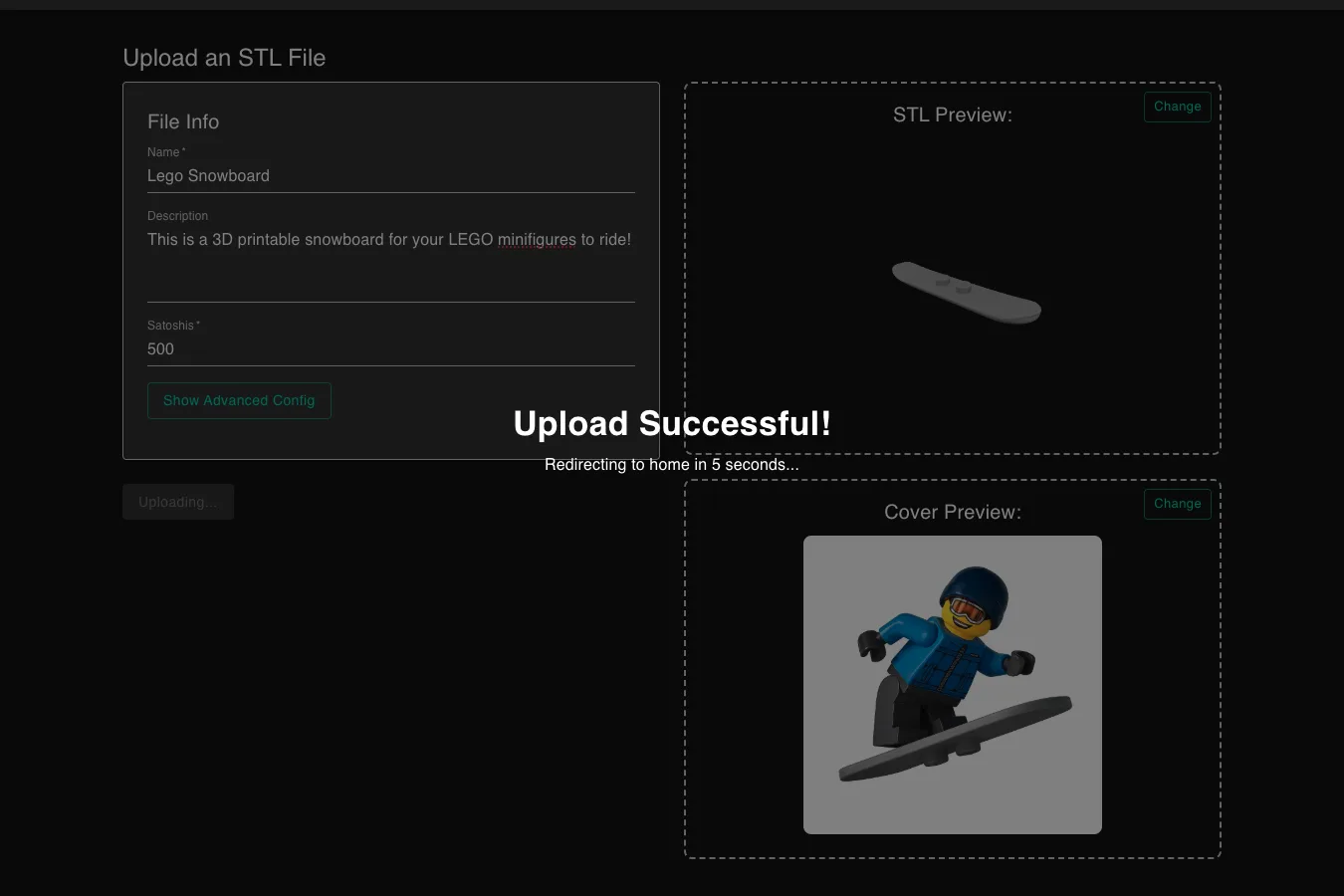
You've successfully wired up the Upload Files page with: file encryption, UHRP upload, PushDrop transaction, Overlay admission, and Key Server storage. The next steps are to build the Store and Details pages to browse and purchase these listings!