
Baskets & State Management
Learn how wallet baskets model user-local BSV app state as UTXOs, and when to use direct peer-to-peer flows or overlays instead.
A basket is a named collection of unspent transaction outputs tracked by a BRC-100 wallet. Baskets give applications a portable way to store user-local state as UTXOs while the wallet enforces permissions.
Baskets come from BRC-46 output tracking. When an app creates an output, it can ask the wallet to place that output into a basket:
1{
2  "outputs": [
3    {
4      "lockingScript": "<locking-script-hex>",
5      "outputDescription": "Application state output",
6      "satoshis": 1000,
7      "basket": "todo tokens",
8      "customInstructions": "{ ... }"
9    }
10  ]
11}Later, the app can ask the wallet to list outputs in that basket. Spending an output removes it because the UTXO no longer exists. If an app no longer needs to track an unspent output, it can relinquish it without creating a spend.
Why Baskets Matter
Baskets let developers model application state as outputs instead of rows in an app-owned database.
- User-centered permissions: the wallet decides which app can inspect or use which basket.
- Portable state: another compatible app can request the same basket if the user approves.
- UTXO-native tokens: an output can be the token, document pointer, access grant, or workflow item.
- Less indexing work: local state can live with the user until it needs public discovery.
Three State Models
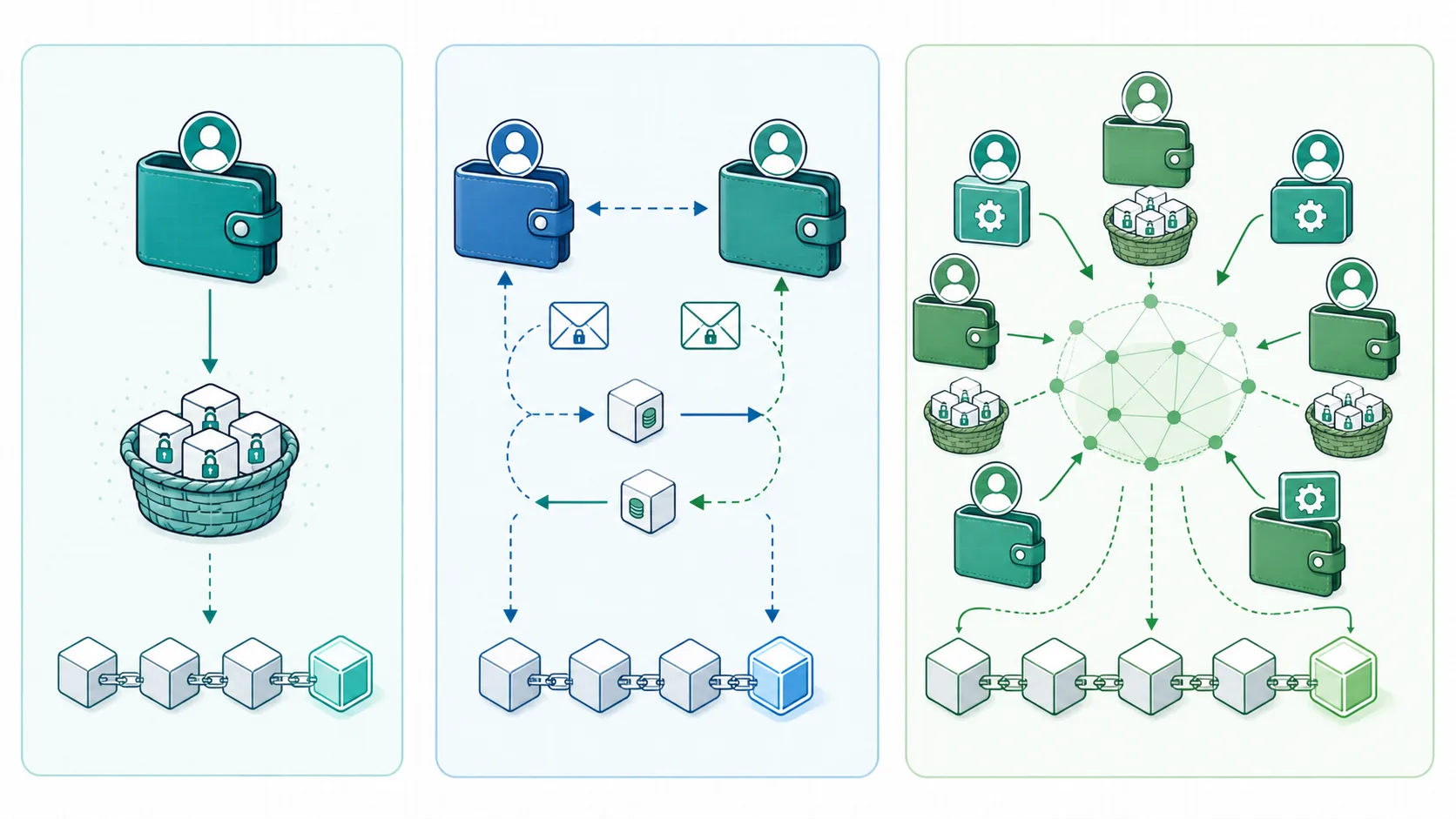
| Model | Where the state lives | Who updates it | Use it for |
|---|---|---|---|
| Local basket | One user's wallet | That user and approved apps | Personal tasks, drafts, preferences, private tokens, app-local inventory |
| Direct peer-to-peer | Messages and transactions exchanged between wallets | The fixed participants | Chat, offers, invoices, private payment coordination, two-party contracts |
| Overlay | Public or permissioned overlay services tracking topic-specific outputs | Many participants under protocol rules | Marketplaces, public listings, discovery, scarce items, shared indexes |
The same app can use all three. A marketplace might keep drafts in a local basket, send buyer/seller messages through MessageBox, and publish active listings to an overlay.
Local Basket Example
- A to-do app creates one output per task.
- Each output is placed in a
todo tokensbasket. - On launch, the app calls
listOutputsfor that basket. - Completing a task spends or relinquishes the output.
No server has to be the source of truth for the user's private task list.
Direct Peer-to-Peer Example
- Alice creates an offer and sends it to Bob through MessageBox.
- Bob reviews the offer and returns a signed response.
- The two wallets exchange encrypted messages and payment tokens until the workflow is complete.
This pattern is useful when exactly two parties need coordination and the state is not meant to be globally searchable.
Overlay Example
- A creator lists a digital item by creating a protocol-specific output.
- A topic manager validates whether the output belongs in the marketplace topic.
- Lookup services index valid outputs so apps can search current listings.
- Buyers contact sellers or pay through the app's chosen protocol.
Use overlays when many users need a shared, queryable view of app state.
Developer Tips
- Name baskets clearly and consistently.
- Request only the baskets and output details your feature needs.
- Use
customInstructionsfor spending hints your app will need later. - Paginate
listOutputsresults for large baskets. - Prefer
relinquishOutputwhen the app should stop tracking an unspent output without spending it. - Move public or multi-party state into overlays instead of overloading a user's local basket.